Behavior Tree Editor
During my studies at The Game Assembly, one of the assignments was to create a tool of our choosing. I decided to build a behavior tree editor using Dear ImGui, as working without one often leads to multiple issues.
The tool is heavily inspired by Unreal Engine’s implementation of behavior trees, which includes a custom blackboard editor to edit variables. For those who don’t know, behavior trees are built out of multiple simple nodes that are connected to design and create complex logic of an AI.
Motivation
My motivation for this tool came during the development of the fifth game project where I implemented 4 different types of enemies using behavior trees. Since their logic was hardcoded, it came with clear bottlenecks that noticeably slowed down development. These were the major drawbacks:
- Lack of visual overview – When they only exist in code, it quickly becomes difficult to understand the full structure of the tree.
- Difficult to tell which node is running – No clear visual of where the AI is in the tree at any given moment.
- Time consuming debugging – Identifying the problem requires setting breakpoints across multiple nodes.
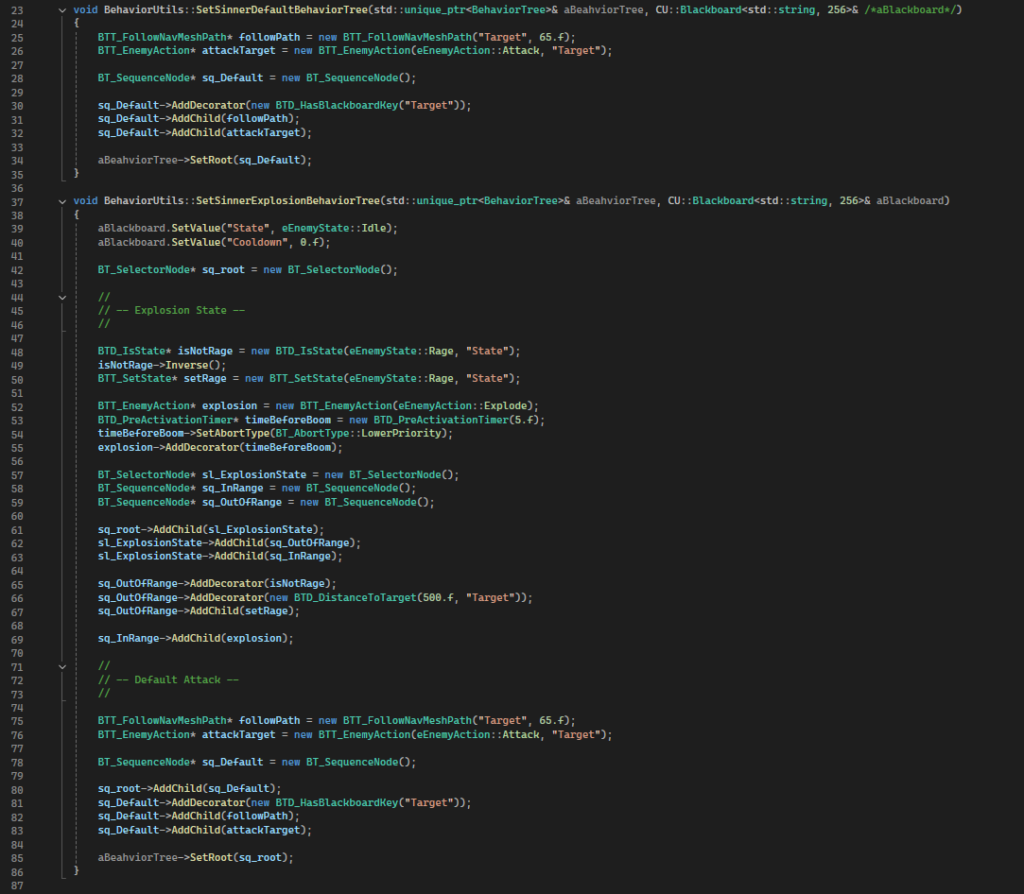
Messy behavior tree logic created with code
Features
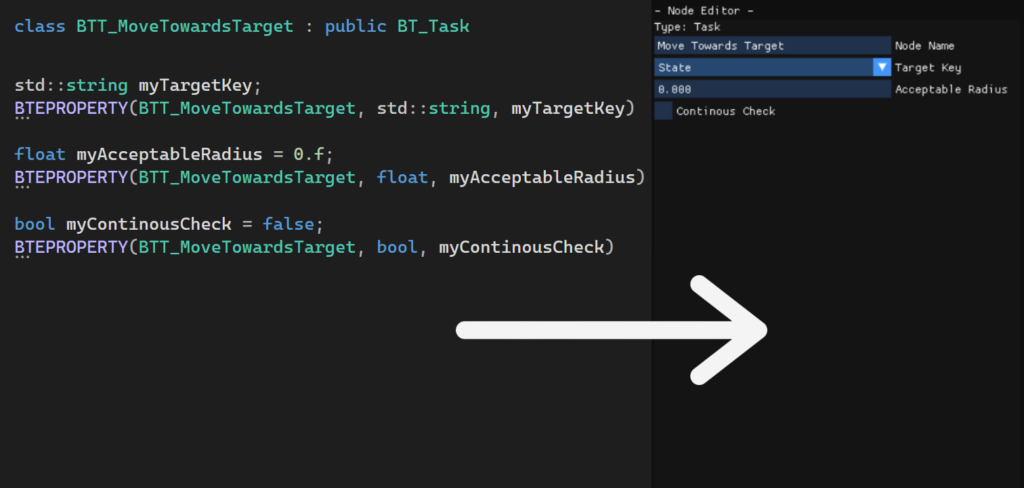
Automatic variable exposure through macros
Demonstration debug features from enemies in the TGA sixth game project
Behavior Tree Overview
- Create, remove, connect, and configure nodes visually.
- A clear visual tree structure.
- Ability to add and remove components to nodes such as decorators or services.
- Automatic exposure of editable node and component variables via code macros.
Blackboard editor
- Create, edit, and delete key variables.
- Allows nodes to share variables with each other.
JSON export/import
- Behavior trees are exported from the editor as JSON and can then be imported where needed.
Real-time visualization
- Provides clear debugging with a visual indication of which node is currently running in the editor.
Debugging support
- Toggle debug mode at runtime for the closest enemy with an active behavior tree.
- Activates node specific debugging (e.g., navmesh paths).
- Ability to set a breakpoint at specific nodes
Summary
This project showed me that building sustainable tools, such as a behavior tree system, requires far more design thinking than one might initially expect.
This tool took a lot more time than expected because I had to rebuild the entire system from scratch after realizing that not everything could fit into just a header and source file. While the whole process was time consuming, it taught me a ton about the importance of structure for scalability.
However, once the system was in place, the upfront investment paid off in the long term! In the sixth game project, I was able to implement the enemy AI and fix its issues much faster compared to previous project.
Bottlenecks solved by the editor
- Difficult to understand the tree structure when it only exists in code.
- Hard to know which node is currently executing at runtime for a given enemy.
- Time-consuming debugging through manual breakpoints.
What the editor enables
- Immediate visual understanding of the behavior tree structure.
- Real-time highlighting of the active node.
- Ability to place breakpoints on the exact node needed.
- This all leads to much faster identification of logical errors.